Critical Android Malware Stealing Banking Credentials, Experts Issue Warning
Android users across the globe are facing a rapidly growing threat as multiple sophisticated malware families have been discovered specifically designed to steal banking login credentials, intercept one-time passwords, and in some cases, take complete remote control of a victim’s device without them ever knowing it happened.
Cybersecurity researchers from firms including Kaspersky, Cleafy, Bitsight, Malwarebytes, and ThreatFabric have all raised the alarm in recent months, publishing findings that paint a deeply concerning picture of where mobile banking threats are headed. The numbers alone tell a troubling story. According to Kaspersky’s mobile threat data, Trojan banker attacks on Android smartphones surged by 56% in 2025 compared to the year before, with a staggering 255,090 new malicious banking trojan installation packages detected during the year, representing a 271% jump in new variants. In 2024, the figure was already alarming at over 1.24 million attacks, a 196% rise from 2023.
Experts say the acceleration is not random. It is the direct result of a shift toward what the industry calls Malware-as-a-Service (MaaS), a model where criminal developers build and maintain sophisticated malware tools and then rent them out to other criminals for a monthly subscription fee, sometimes as low as a few hundred dollars. This has drastically lowered the technical barrier to launching a serious attack, meaning someone with very little technical skill can now deploy banking malware that would have been considered advanced-level just a few years ago.
How the Critical Android Malware Actually Works
Understanding how these threats operate is important because it helps explain why they are so effective and why even cautious users have fallen victim.
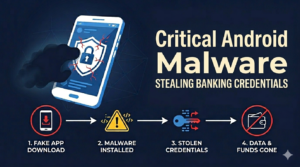
The most common entry point is a fake or trojanized app. Security researchers at Cyfirma documented a case where malware was disguised as a news reader or a digital identity app. A user downloads what looks like a legitimate tool, installs it, and then gets asked to grant permissions, particularly something called Accessibility Services, which Android provides to help users with disabilities. Once that permission is granted, the malware has near-total control over the device. It can read what is on the screen, tap buttons, fill out forms, and interact with apps exactly as if it were the user sitting there doing it.
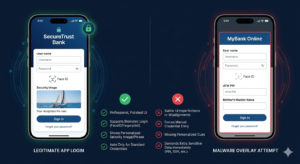
But the real danger comes from what researchers call overlay attacks. When a user opens their banking app, the malware instantly places a convincing fake login screen on top of the real one. The user types in their username and password, thinking they are logging into their bank, but the malware captures those credentials and sends them to a remote server controlled by the attackers. The real app never even opens. The overlay simply closes once the theft is done, and the user often has no idea anything went wrong.
The Anatsa banking trojan, also known as TeaBot, is one of the most well-documented examples of this technique in action. In July 2025, researchers at ThreatFabric discovered that Anatsa had managed to get onto the official Google Play Store, disguised as a “Document Viewer” application. By the time it was removed, it had been downloaded by an estimated 90,000 users. The malware uses keyloggers, overlay attacks, and credential interception to steal banking details across more than 831 financial institutions, with its reach extending across the United States, Canada, Germany, South Korea, and multiple European countries.
What makes Anatsa particularly dangerous is its patience. The attackers typically upload a clean, functional app first, let it gather thousands of genuine downloads to build credibility, and then push a malicious update weeks later. By that point, the app has legitimate reviews and a healthy download count, making it look trustworthy.
A New Generation: Albiriox and On-Device Fraud
If Anatsa represents one generation of threats, a malware family called Albiriox, first identified in late 2025 by Cleafy researchers, represents the next. Albiriox is not content with simply stealing credentials. It is built for what researchers call On-Device Fraud, which means it can take over the phone in real time and initiate actual money transfers from inside the victim’s genuine banking app, using the victim’s own authenticated session.
This is significant because traditional bank security systems often look for logins from new devices or unusual locations as a red flag. When the fraud happens on the victim’s own phone, inside an already-authenticated app session, many of those security triggers simply do not fire. Albiriox achieves this through a technique called AcVNC, which uses Android Accessibility Services to stream the device’s screen live to an attacker, who can then interact with it remotely, bypassing even the security flag that apps use to block screenshots.
Albiriox is sold on cybercrime forums for around $650 to $720 per month. It already targets more than 400 banking, payment, and cryptocurrency applications worldwide. Its developers, believed to be Russian-speaking based on forum activity and linguistic patterns in the code, began recruiting high-reputation cybercriminals in September 2025 before making it publicly available the following month.
Another active threat is ToxicPanda, a banking trojan that initially targeted Southeast Asia but by 2025 had shifted its focus to Europe, particularly Portugal and Spain, with the campaign at one point reaching approximately 4,500 infected devices. ToxicPanda specifically overlays PIN and pattern input screens to steal device unlock credentials in addition to banking details, giving attackers even broader access to the device.
Why Android is Particularly Vulnerable
Android’s openness, one of its greatest strengths, is also its biggest liability when it comes to malware. The operating system allows users to install apps from outside the official Play Store, a process called sideloading. While legitimate reasons to sideload exist, it is also the primary channel through which malware spreads. Kaspersky reported in early 2026 that throughout 2025, cases emerged worldwide where Android devices arrived already infected with malware before they were even taken out of the box, with a powerful trojan called Triada embedded in the firmware of certain lower-cost devices during the supply chain process.
Even the Play Store itself is not immune, as the Anatsa campaign demonstrated. Malware authors have become skilled at passing initial security checks and then introducing malicious functionality through updates. Google has made ongoing efforts to strengthen Play Protect and tighten app review processes, and Android 16 introduced restrictions that deny accessibility permissions to apps during active phone calls, directly targeting one social engineering technique. However, experts are largely in agreement that no single measure has proven sufficient to stem the tide on its own.
What You Can Do Right Now
Security researchers are consistent in their recommendations, and none of them require deep technical knowledge.
First, only install apps from the official Google Play Store and even then, pay attention to who the developer is, how many reviews the app has, and whether the permissions it requests make sense for its stated purpose. A calculator app asking for Accessibility Services is a serious red flag.
Second, review which apps on your phone currently have Accessibility Services permissions. Go to Settings, then Accessibility, and check the list. Anything unfamiliar should be removed immediately.
Third, enable two-factor authentication on your banking accounts, but be aware that some malware is capable of intercepting SMS-based codes. Where your bank offers an authenticator app rather than SMS, that is the stronger option.
Fourth, keep your phone’s operating system updated. Many malware families exploit known vulnerabilities that are patched in newer Android versions.
Finally, if you notice your phone behaving strangely, such as the screen activating on its own, apps opening without input, or unusual battery drain, take it seriously. These can be signs of remote access tools running in the background. Contact your bank immediately if you notice any unauthorised transactions, and report the device to your carrier.
The threat landscape for Android banking malware is not slowing down. If anything, the commercialisation of these tools through MaaS models means more criminals can access them with less effort than ever before. Staying informed and cautious about what you install on your phone remains, according to every major cybersecurity firm, the single most effective line of defence available to ordinary users.
Click Here To Explore More Blogs